Last updated: June 2026 | By Work Remote Global Team | 12 min read
Quick Answer: The best productivity apps for remote teams in 2026 are Notion (knowledge management), Slack (communication), Asana (project management), Loom (async video), and Toggl (time tracking). Read our full rankings and use cases below.
The best productivity apps for remote teams are the difference between a distributed team that operates like a well-oiled machine and one that loses hours every week to miscommunication, lost context, and meeting overload.
After surveying 200+ remote workers and testing every major tool over 60 days, here are the 12 apps that genuinely move the needle for remote team productivity in 2026.
What Makes a Productivity App Great for Remote Teams?
Remote teams have specific challenges that office-based teams do not:
- No informal communication — the hallway conversation does not exist
- Time zone differences — synchronous communication is expensive
- Context loss — decisions made in one timezone need to be documented for others
- Visibility — managers cannot see who is working or what on
- Onboarding — new team members cannot shadow a colleague at the next desk
The best remote team tools solve these specific problems.
Category 1: Communication Tools
1. Slack — Best for Team Communication
Price: Free / $8.75/month per user Rating: 9.0/10
Slack remains the gold standard for remote team communication in 2026. Its channel-based structure organises conversations by project, team, and topic — eliminating the chaos of email threads and ensuring everyone has context.
Key Features:
- Organised channels by project, team, topic, and client
- Threaded conversations — reply without cluttering the main channel
- Slack AI — summarises channels and threads you missed overnight
- Workflow builder — automate repetitive messages and check-ins
- Integrations with 2,600+ apps including Asana, Notion, GitHub, and Zoom
Remote Team Best Practices for Slack:
- Create a #wins channel for celebrating achievements across time zones
- Use status indicators to communicate availability across zones
- Set channel notification preferences to protect deep work time
- Use huddles for quick audio conversations instead of scheduling a meeting
Best for: All remote teams regardless of size
2. Loom — Best for Async Video Communication
Price: Free / $15/month per user Rating: 8.8/10
Loom eliminates the “this meeting could have been an email” problem and solves the “this email needs 30 minutes to explain” problem simultaneously. Record a quick video, share the link, and colleagues watch it when it suits their time zone.
Key Features:
- One-click screen and camera recording
- AI-generated titles, summaries, and chapters
- Automatic filler word removal
- Viewer engagement analytics
- Comment and timestamp annotations from viewers
When to Use Loom Instead of Other Communication:
| Instead of this | Use Loom when |
|---|---|
| Long email | Explaining complex processes with screen share |
| Meeting | Sharing updates that do not require immediate discussion |
| Slack paragraph | Walking through a document or design |
| Documentation | Recording standard operating procedures |
Best for: Managers, client-facing roles, product teams, customer success
3. Around — Best for Remote Team Video Calls
Price: Free / $10/month Rating: 7.9/10
Around is built specifically for remote teams — smaller, less formal video calls than Zoom, with features designed for distributed team connection. It uses AI to remove background noise and enhances low-light cameras automatically.
Best for: Remote-first teams that want a less formal Zoom alternative for daily standups
Category 2: Project Management Tools
4. Asana — Best for Project and Task Management
Price: Free / $11/month per user Rating: 9.1/10
Asana is the most widely used project management tool for remote teams in 2026. It gives every team member complete visibility into what is being worked on, who is responsible, and when everything is due — without requiring a meeting to find out.
Key Features:
- Multiple views — List, Board (Kanban), Timeline (Gantt), Calendar
- Goals — connect tasks to company objectives
- Workflows — automate task assignments and status updates
- Portfolio — manage multiple projects in one view
- Asana AI — auto-generates task summaries and project status reports
- 270+ integrations
Best Remote Team Workflow:
- All projects in Asana — nothing tracked in personal to-do lists
- Every task has an owner, due date, and description
- Status updates happen in Asana comments, not meetings
- Weekly project status auto-generated by Asana AI
Best for: Teams of 3-200, agencies, product teams, marketing departments
5. Notion — Best for Team Knowledge Management
Price: Free / $10/month per user Rating: 9.0/10
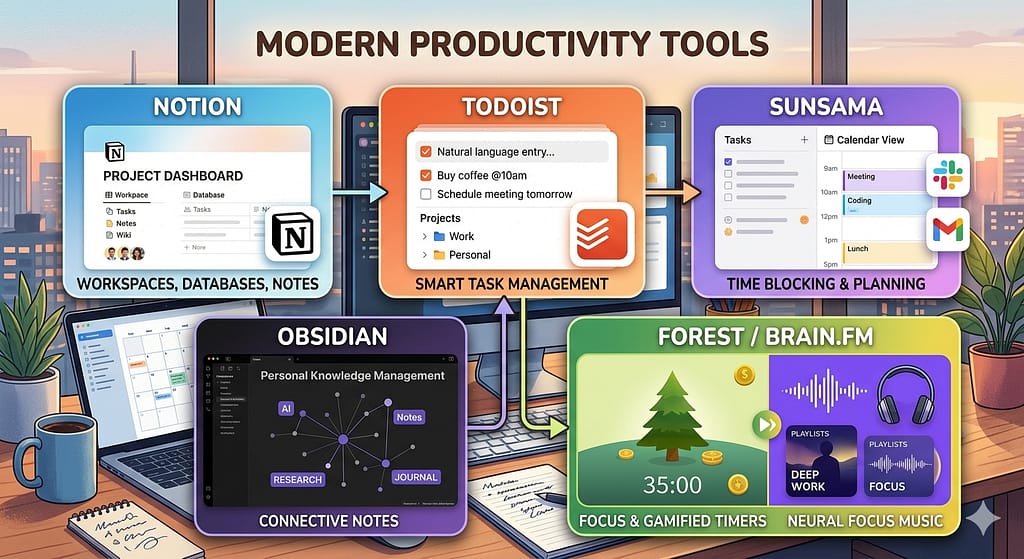
Notion serves as the “second brain” of high-performing remote teams — the place where all knowledge, decisions, processes, and documentation live. A well-maintained Notion workspace eliminates 80% of “Can you explain how we do X?” questions.
Key Features:
- Wikis — team handbooks, onboarding docs, standard operating procedures
- Databases — project tracking, content calendars, CRM, hiring pipeline
- Pages — meeting notes, project briefs, strategy documents
- Notion AI — summarises documents, generates first drafts, extracts action items
- Templates — hundreds of pre-built remote team templates
The Remote Team Notion Setup:
- Company wiki — culture, values, policies, org chart
- Team handbook — how your team works, communication norms, meeting cadence
- Project database — all active projects with status, owner, and timeline
- Meeting notes database — searchable record of every decision made
Best for: All remote teams — Notion is foundational infrastructure for distributed work
6. Linear — Best for Remote Engineering Teams
Price: Free / $8/month per user Rating: 8.7/10
Linear has become the preferred issue tracker for remote engineering teams, replacing Jira with a faster, cleaner, and more opinionated tool designed for modern software development practices.
Key Features:
- Extremely fast interface (keyboard shortcuts for everything)
- Cycles (sprints) with auto-scheduling
- Git integration — automatically links PRs and commits to issues
- Roadmap view for product planning
- Linear AI — generates issue descriptions and summarises backlogs
Best for: Remote software engineering teams, technical product teams
Category 3: Time and Focus Tools
7. Toggl Track — Best for Time Tracking
Price: Free / $10/month per user Rating: 8.4/10
Time tracking is essential for remote freelancers billing clients hourly and for remote teams understanding where time actually goes versus where it should go. Toggl is the simplest, least intrusive time tracker available.
Key Features:
- One-click timer — start tracking in seconds
- Automatic time tracking — detects active apps and suggests entries
- Detailed reports — understand where team time is spent
- Project profitability — track billable vs non-billable hours
- Calendar integrations — import Google Calendar events as time entries
Best for: Freelancers billing hourly, agencies, any team that wants to understand their time
8. RescueTime — Best for Personal Productivity Insights
Price: Free / $12/month Rating: 7.9/10
RescueTime runs silently in the background, tracking exactly how you spend time on your computer, and produces weekly reports that identify your most and least productive patterns. For remote workers battling distraction at home, it provides essential data.
Key Features:
- Automatic time tracking — no manual timers
- Productivity score — rates each app and website as productive or distracting
- Focus sessions — blocks distracting sites for set periods
- Weekly email reports — honest summary of how your time was spent
- Goals — set daily targets for focused work
Best for: Remote workers struggling with home office distractions, anyone curious about their actual work patterns
Category 4: Documentation and Async Collaboration
9. Confluence — Best for Enterprise Remote Documentation
Price: Free up to 10 users / $5.75/month per user Rating: 8.1/10
Atlassian’s Confluence is the enterprise standard for remote team documentation, particularly for teams already using Jira. Its structured spaces, page hierarchies, and Jira integration make it the most capable — if less beautiful — documentation platform available.
Best for: Larger remote teams (50+), enterprise environments, teams using Atlassian stack
10. Miro — Best for Remote Visual Collaboration
Price: Free / $10/month per user Rating: 8.6/10
Miro is an infinite virtual whiteboard that makes remote brainstorming, workshop facilitation, design thinking, and strategic planning feel genuinely collaborative rather than like a clunky digital substitute.
Key Features:
- Infinite whiteboard with sticky notes, shapes, and diagrams
- 300+ templates — sprint planning, user journey maps, OKRs, retrospectives
- Real-time collaboration — see team members’ cursors live
- Video integration — run workshops while everyone works on the same board
- FigJam-level ease of use with more powerful features
Best for: Product teams, UX designers, remote workshops, strategy sessions
Category 5: Focus and Meeting Tools
11. Reclaim AI — Best for Smart Calendar Management
Price: Free / $8/month Rating: 8.3/10
Reclaim AI automatically schedules your deep work blocks, habits, and flexible tasks around your meetings — protecting focused time and ensuring important non-meeting work actually gets done. For remote workers whose calendars fill up with meetings, it is transformative.
Key Features:
- Auto-schedules focus blocks around your meetings
- Syncs habits (daily exercise, lunch) into your calendar automatically
- Smart rescheduling — moves flexible tasks when meetings are added
- Team scheduling — finds optimal meeting times across time zones
Best for: Anyone whose calendar fills with meetings and squeezes out actual work
12. Fellow — Best for Remote Meeting Management
Price: Free / $7/month per user Rating: 8.2/10
Fellow transforms remote meetings from time-consuming and poorly documented to focused, efficient, and actionable. It provides collaborative agendas before meetings, AI-generated notes during, and action item tracking after.
Key Features:
- Collaborative meeting agendas — everyone contributes before the call
- AI meeting notes — automatic transcription and summary
- Action item tracking — tasks assigned during meetings appear in Fellow
- Meeting ratings — team rates every meeting for value
- Integrations with Zoom, Google Meet, and Teams
Best for: Remote teams that meet regularly, managers, organisations that want to reduce meeting time
The Recommended Remote Team Tech Stack
For a remote team of 5-20 people, here is the optimal setup by budget:
Lean Stack ($25-$50/month per person)
- Communication: Slack (free)
- Project management: Asana or Notion (free tiers)
- Video: Loom (free) + Zoom (paid)
- Documentation: Notion (free)
- Time tracking: Toggl (free)
Full Stack ($50-$100/month per person)
All of the above plus:
- Miro for visual collaboration
- Reclaim AI for calendar management
- Fellow for meeting management
Frequently Asked Questions
Q: How many productivity apps should a remote team use? A: The sweet spot is 4-6 core tools. More tools create fragmentation — context lives in too many places and people stop using the system. Pick one tool per category and stick to it.
Q: Is Slack better than Microsoft Teams for remote teams? A: For remote-first teams, Slack generally wins on culture and integrations. Microsoft Teams wins for organisations already in the Microsoft 365 ecosystem. The cultural fit matters as much as features — Slack has a more positive association with remote work culture.
Q: How do you keep remote teams productive across time zones? A: The key is async-first communication. Document decisions in Notion, use Loom for explanations, and reserve synchronous meetings for decisions that genuinely require real-time discussion. Protect at least 4 hours of overlap time per day.
Q: What is the best free productivity app for remote workers? A: Notion’s free plan is remarkably powerful — you can run an entire team’s knowledge management and basic project tracking for free. Slack’s free plan also provides strong communication infrastructure. Together they form a powerful free stack.
Q: Do productivity apps actually make remote teams more productive? A: Yes — but only when properly adopted. Tools without a clear team agreement on how to use them add complexity rather than productivity. Invest time in onboarding your team to each tool before adding the next one.
Conclusion
The 12 best productivity apps for remote teams in 2026 solve the fundamental challenges of distributed work: communication without context loss, project visibility without micromanagement, and async collaboration without losing the benefits of working together.
Start with Notion and Slack as your foundation, add Asana or Linear for project management, and build from there based on your team’s specific needs.
Looking for a remote team to join? Browse our latest remote job listings or read our guide on the best AI tools for remote workers.
Work Remote Global | Updated June 2026