

Searching for a remote job while you’re still employed? Here’s how to do it quietly, strategically, and without burning bridges.
June 19, 2026 · 12 min read

TL;DR
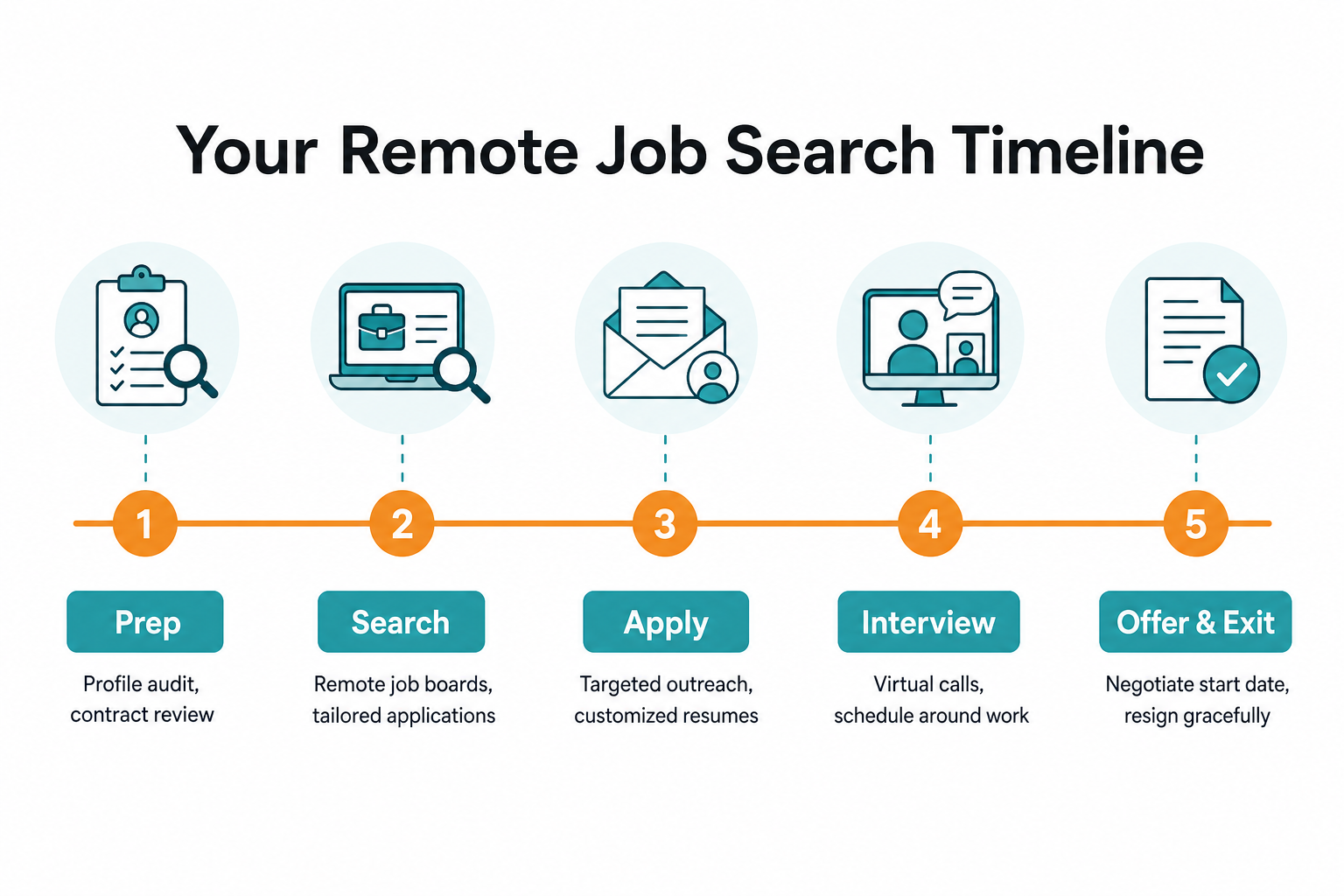
You can absolutely get a remote job while working full-time – and being employed actually makes you a stronger candidate. The key is running a quiet, disciplined search: use personal devices only, update your LinkedIn privacy settings before touching your profile, search on dedicated remote job boards like Work Remote Global that aggregate verified listings daily, and schedule interviews outside work hours. Don’t tell anyone at work, ask past employers (not current colleagues) for references, and prepare a remote-specific resume that highlights async skills and tools. Budget 2-4 months, stay consistent, and exit gracefully when the offer lands.
Let me be straight with you: searching for a remote job while you’re still working full-time is one of the smartest career moves you can make. Not because it’s easy – it requires a level of stealth and discipline that takes real effort – but because being employed gives you leverage. You’re not desperate. You can walk away from a bad offer. And hiring managers know it.
The challenge, of course, is doing it without blowing your cover at your current job. One careless LinkedIn update, one interview scheduled during your 9 AM standup, and you’ve created a problem you didn’t need. This guide walks you through exactly how to avoid those landmines and come out the other side with a remote role you actually want.
Before you start: check your contract
Before sending a single application, spend 20 minutes reading your employment contract – specifically looking for three things:
- Non-compete clauses – do they restrict you from working for competitors in a certain timeframe?
- Non-solicitation clauses – can you take colleagues or clients with you?
- Moonlighting or dual employment restrictions – some contracts prohibit working a second job simultaneously
In most US at-will employment situations, none of these are an issue for a standard job search. But it’s worth knowing what you’ve signed. If anything looks complicated, a quick consult with an employment attorney (often $150-300 for 30 minutes) is money well spent before you accept an offer somewhere complicated.
One thing that’s never in question: it’s not illegal to look for a job while employed. Full stop.
Step 1: Get crystal clear on what “remote” means to you
Not all remote jobs are the same, and applying to the wrong kind wastes everyone’s time – including yours. Before you hit any job boards, spend a few minutes answering these questions:
- Fully remote vs. hybrid? Some “remote” roles still require you in-office 1-2 days a week. If you’re moving cities or can’t commute, that’s a dealbreaker worth filtering for upfront.
- Async vs. sync heavy? A fully distributed team with async-first culture is a very different work day than a company that just happened to let everyone go remote but runs back-to-back Zoom meetings from 9-5.
- What time zone do they hire in? A company headquartered in London that hires “remotely” may expect you to overlap with UK hours.
Knowing exactly what you’re after lets you write a sharper resume, ask better interview questions, and avoid six weeks of applications to roles that wouldn’t have worked anyway.
Step 2: Run a stealth operation on LinkedIn
LinkedIn is the single most important channel for landing a remote role – but it’s also the most dangerous one when you’re employed. Your manager, your teammates, and your HR department are probably all connected to you on there. A profile that suddenly goes from “Software Engineer at Acme Corp” to “Open to Work” is not subtle.
Here’s how to update your profile without broadcasting it:
Before touching anything:
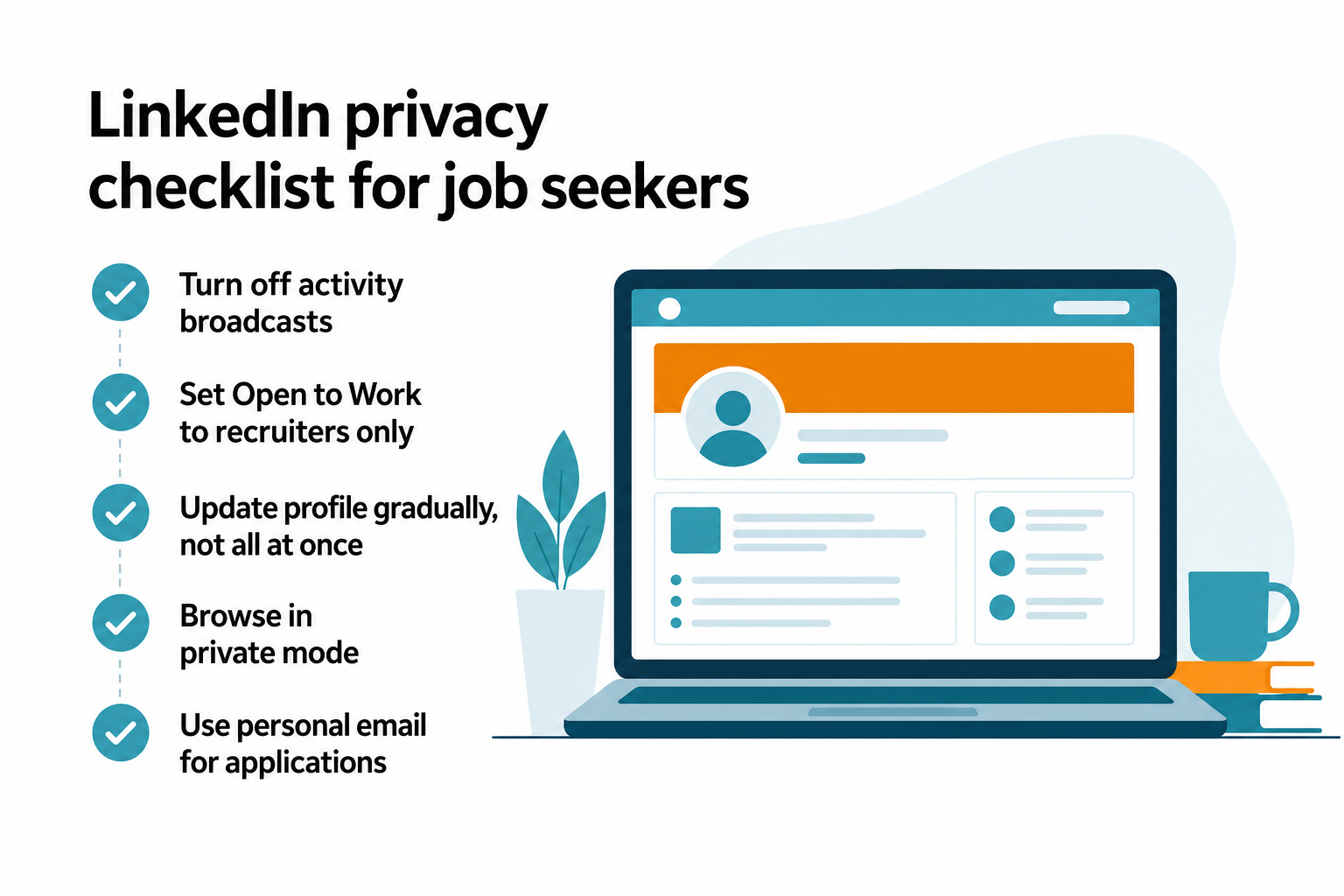
- Go to Settings & Privacy > Visibility > Share profile updates with your network and turn it off. This stops LinkedIn from notifying your connections when you make changes.
- Turn on Open to Work and set it to Recruiters only – this makes the green badge visible to premium recruiters but invisible to your network (including your boss).
- Switch your profile browsing to Private mode so you don’t show up in other people’s “Who viewed your profile” notifications.
When updating:
- Don’t change everything at once. Spread updates across a week or two – update your skills one day, tweak your headline another.
- Keep your current job title accurate. Changing it or leaving it blank raises flags.
- A professional headshot and complete profile significantly increases recruiter outreach without triggering any notifications if you follow the steps above.
One user on r/RemoteJobs who successfully landed a tech sales role put it well:
“LinkedIn is everything. I built out my profile properly, started posting a little, commenting on industry posts, and connecting with people. Just being visible made a huge difference… Cold outreach works. I sent cold emails and even did some cold calls to hiring managers. It got me interviews and referrals that I never would’ve landed just hitting ‘apply’ 100 times on job boards.”
- u/ZealousidealPop6445, r/RemoteJobs
Step 3: Build a remote-ready resume
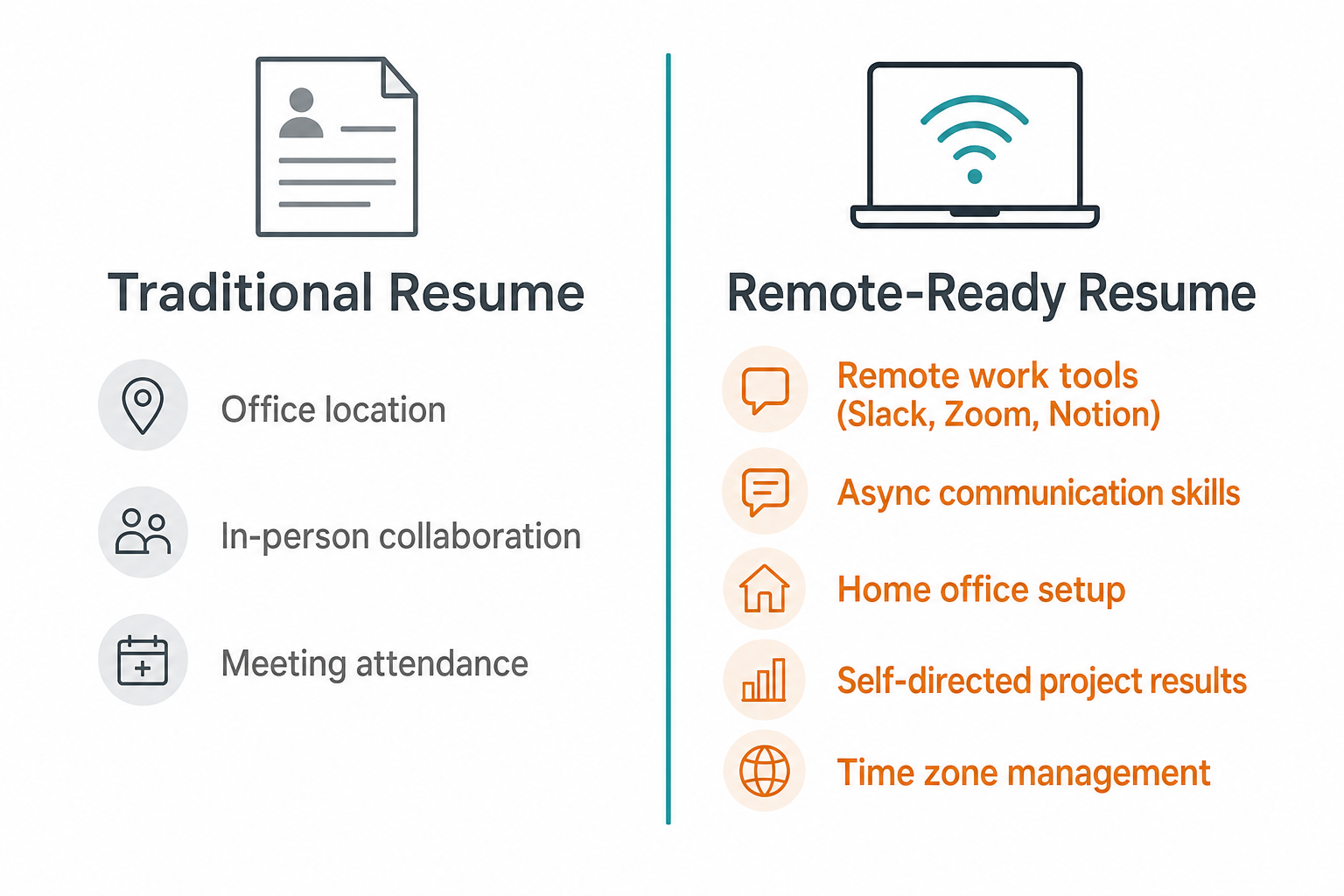
Your current resume almost certainly isn’t optimized for remote roles. Most resumes are written with in-person work as the default, which means they’re missing the keywords and signals that remote-hiring managers look for.
A few things to add or adjust:
Add remote-specific skills and tools:
- List tools you actually use: Slack, Zoom, Notion, Asana, Jira, Loom, Figma, Google Workspace, etc.
- If you’ve managed projects asynchronously, say so explicitly: “Led cross-functional project across 3 time zones using async-first workflows”
Reframe your accomplishments for remote context:
- “Collaborated with distributed team of 8 engineers across US and EU time zones”
- “Managed client relationships 100% remotely, achieving 96% satisfaction score”
- Results and output matter more in remote roles than presence, so quantify everything you can
Cover letters for remote roles:
Don’t write a generic one. Remote employers screen heavily for self-management and communication skills – show both in your letter. Mention specifically why you thrive in async environments, how you communicate across time zones, or that you already have a quiet home office setup.
A tool worth knowing: Work Remote Global’s AI Cover Letter Generator creates tailored letters in under 30 seconds from a job description. You still need to personalize it, but it’s a solid starting point when you’re applying to 10+ roles a week on top of a full-time job.
Step 4: Find the right job boards
Most general job boards mix in-office and remote roles in a way that wastes time. You want boards that are remote-first and filter out the fluff.
| Job Board | Best For | Cost |
|---|---|---|
| Work Remote Global | 12,400+ verified global remote listings, updated daily | Free |
| FlexJobs | Curated, scam-free listings; strong remote + flexible filter | Paid subscription |
| Remote.co | Quality-over-quantity remote jobs across categories | Free |
| We Work Remotely | Tech, design, marketing remote roles | Free to browse |
| Wellfound | Startup and tech remote roles with salary visibility | Free |
| LinkedIn Jobs | Filter by “Remote” – massive volume, variable quality | Free |
Work Remote Global is a standout here because it’s purpose-built for this exact use case: a curated aggregator pulling 12,400+ verified listings from across 180+ countries, updated daily. No spam, no jobs that call themselves remote but require three days a week in an office. Set up an RSS feed or check it daily as part of your morning routine.

Step 5: Run a confidential job search
This is where most employed job seekers slip up. A few ground rules that sound obvious but are genuinely easy to forget:
Device and network hygiene:
- Only use personal devices and personal data. No applications from your work laptop. No job-related emails from your work account. No browsing job listings on company WiFi. IT departments can and do monitor network traffic.
- Set up a dedicated email address for your job search if you want to keep things extra clean (e.g., yourname.jobs@gmail.com).
Reference management:
- When a job application asks for references, use former managers and colleagues – not anyone at your current company. Be upfront with those contacts that they may be contacted, so they’re not caught off guard.
- If an application requires a current employer reference, be honest that you’re conducting a confidential search and ask if previous supervisors are acceptable. Most hiring teams are completely fine with this.
Ask recruiters for discretion:
- Most external recruiters and talent teams understand what “I’m conducting a confidential search” means. State it early in your first conversation. A good recruiter won’t contact your employer without your permission.
Keep it off your social feeds:
- Don’t post about “exploring new opportunities” on LinkedIn, X, or anywhere else. That’s how your manager finds out before you’re ready.
- Don’t complain about your current job online, even vaguely. It’s amazing how these things surface.
Step 6: Schedule interviews without blowing your cover
The logistics of interviewing while employed are genuinely tricky. Here’s what actually works:
For phone and video screens:
- Request early morning slots (7-9 AM), lunch hour, or late afternoon (after 5 PM)
- Be upfront with the recruiter: “I’m currently employed and would appreciate off-hours scheduling – would that work for your team?” Most hiring teams hear this regularly and accommodate it without hesitation.
- Virtual interviews give you maximum flexibility and are now standard for remote roles – lean into them.
For final or in-person rounds:
- Use a vacation day or personal day rather than calling in sick. You won’t have to remember a story, and you don’t risk your credibility if someone sees you out.
- Plan your outfit in advance if you’re interviewing somewhere more formal. Showing up to a casual tech office in a full suit on a random Thursday is basically announcing your interview.
During the interview:
- Prepare your home office. Good lighting, a quiet room, a stable internet connection. Remote employers pay attention to your remote setup – literally and figuratively.
- Silence all notifications. A Slack ping from your current job mid-interview is awkward for everyone.
Step 7: Handle the offer and exit gracefully
You got an offer. Now the job search is over – but how you exit matters.
Before accepting:
- Negotiate the start date. Two weeks’ notice is standard, but many remote employers are flexible on timing, especially if you explain that you want to honor your current commitments professionally.
- Get everything in writing before you resign. Verbal offers fall through. A signed offer letter is the only time it’s safe to give notice.
Resigning:
- Give proper notice – typically two weeks, sometimes more for senior roles. Check your contract.
- Keep the conversation professional. “I’ve accepted an opportunity that aligns with my long-term goals” is all you need to say. No need to criticize the company or explain every detail.
- Don’t disappear. Finish your projects, document your work, and help with the handoff. The people you leave behind are still your professional network.
After the announcement:
- Update your LinkedIn publicly now. Connect with your new team. Change your profile headline.
- Send thank-you notes to mentors, managers, or colleagues who helped you along the way – even if they don’t know they did.
Common mistakes that give you away
Most people who blow their cover do it in one of these five ways:
- Doing job search activities on their work laptop – IT departments can see more than you think
- Asking a current colleague for a reference – word travels fast in most workplaces
- Scheduling interviews during work hours without PTO – your absence is noticed more than you expect
- Overhauling their LinkedIn all at once – a profile that goes from 60% complete to 100% overnight is a tell
- Venting about their job on social media – hiring managers Google you; so do your coworkers
Try Work Remote Global
If you’re ready to start browsing, Work Remote Global is one of the best places to begin. It aggregates 12,400+ verified remote listings across 180+ countries – no spam, no fake-remote postings – with daily updates and powerful filters for job type, location, and category.
The platform is free for job seekers and also includes a 30-second AI cover letter generator that tailors your letter to any job description. When you’re applying to multiple roles per week on top of a full-time job, that kind of tool is a real time-saver.

Start with a search on Work Remote Global’s job board and pair it with the stealth LinkedIn strategy above. That combination – active sourcing plus inbound recruiter interest – is genuinely the fastest path to a remote offer when you’re already employed and don’t have unlimited time to spare.
Frequently Asked Questions
Is it legal to look for a remote job while still employed?
Yes, in most cases it’s completely legal. The US is predominantly at-will employment, meaning employees can leave at any time without legal consequences. Check your employment contract for non-compete clauses or moonlighting restrictions, but in most roles, a confidential job search carries no legal risk.
How do I update my LinkedIn without my employer knowing?
Go to Settings & Privacy > Visibility and turn off ‘Notify your network’ before making any changes. Use LinkedIn’s Open to Work feature set to ‘Recruiters only’ so your current employer won’t see the badge. Update your profile gradually over several weeks rather than all at once, and browse other profiles in private mode.
Should I tell my employer I’m looking for another job?
Almost always, no – not until you have a written offer in hand and are ready to resign. Even well-meaning managers can react unpredictably, pulling you from key projects or starting to look for your replacement before you’re ready to leave. Keep your search confidential and give proper notice when the time comes.
How long does it typically take to find a remote job?
In 2025, only 41% of job seekers landed a position within one month – down from 49% the year before, per The Interview Guys. The average job search resulted in 3.5 offers, with 6% more people taking over three months than in prior years. Remote roles tend to be competitive, so budget 2-4 months for a focused search.
What’s the best time to schedule remote job interviews when you’re working full-time?
Request early morning slots (before 9 AM), lunch hour slots, or late afternoon appointments (after 5 PM). Virtual interviews are especially flexible – let recruiters know upfront that you’re currently employed and need off-hours availability. Most understand and will accommodate. For in-person or multi-round final interviews, use a vacation day rather than calling in sick.